

3D CAD Designer Virtual Assistants — Expert AutoCAD, SolidWorks & Fusion 360 Drafting From $8/hr
Your engineering team is buried in routine CAD work. Revision requests stack up. Technical drawings consume hours that should go toward design innovation. Product launches slip because modeling bottlenecks everything downstream.
A dedicated CAD virtual assistant changes that equation entirely. At VA MASTERS, we recruit Filipino 3D CAD designers who handle modeling, drafting, rendering, and technical documentation — freeing your engineers to focus on what actually moves the needle. Not generic virtual assistants who watched a few AutoCAD tutorials. Real CAD professionals with engineering degrees, manufacturing knowledge, and portfolios that prove it.
We've placed 1,000+ virtual assistants across every industry, and our 3D CAD designers are among the most technically vetted. Every candidate passes a custom skills test built around your specific software, industry standards, and design requirements before they ever reach your interview.
What Is a CAD Virtual Assistant?
A CAD virtual assistant is a remote technical professional who creates, modifies, and manages computer-aided design files for engineering, architecture, manufacturing, and product development teams. Unlike general virtual assistants who handle administrative tasks, a CAD VA is a trained drafter or designer with expertise in industry-standard software and technical drawing conventions.
At VA MASTERS, our CAD virtual assistants hold degrees in mechanical engineering, industrial design, architecture, or related technical fields. They don't just operate software — they understand design intent, manufacturing constraints, GD&T standards, and the complete design-to-production pipeline that separates a capable CAD professional from someone who can draw lines on screen.
The distinction matters. When your virtual construction drafting assistant understands how a part will be machined, they design features that are actually manufacturable. When they know building codes, their architectural drawings don't create problems during permitting. Technical knowledge is what makes the difference between a CAD operator and a CAD professional.
Key Takeaway
A CAD virtual assistant is not an administrative VA who can use AutoCAD. They're a technical professional — with engineering education and real-world design experience — who works remotely as a dedicated member of your team.
CAD Software Your Virtual Assistant Can Master
One of the first questions every engineering manager asks: does your CAD VA know my software? The answer is almost always yes. Filipino CAD professionals are trained across the full spectrum of industry-standard platforms, and our recruitment process specifically tests proficiency in your tools.
Mechanical & Product Design Software
AutoCAD remains the most widely used CAD platform globally. Our AutoCAD virtual assistants handle 2D drafting, 3D modeling, annotation, dimensioning, and drawing set production. They know layer standards, block libraries, and how to create drawings that follow ASME or ISO conventions. Whether you need shop drawings, construction details, or mechanical layouts, AutoCAD proficiency is standard across our CAD VA pool.
SolidWorks is the go-to for parametric mechanical design. Our VAs create fully constrained part models, complex assemblies with proper mates and motion studies, and production-ready drawings with complete GD&T callouts. They understand design tables, configurations, and how to build models that are easy to modify through product lifecycle changes.
Fusion 360 combines CAD, CAM, and simulation in a single platform. Our 3D CAD designers use it for product design, CNC toolpath generation, FEA analysis, and photorealistic rendering. It's particularly popular with startups and product development firms who need an all-in-one solution.
Inventor handles complex mechanical assemblies and sheet metal design. Creo (Pro/ENGINEER) is essential for aerospace and defense work. CATIA dominates automotive and complex surface modeling. Our recruitment process identifies candidates with specific platform expertise matching your requirements.
Architecture, Engineering & Construction (AEC) Software
Revit is the BIM standard for architectural and MEP design. Our drafting and rendering assistants create building models, generate construction documents, coordinate MEP systems, and produce clash detection reports. They understand LOD requirements, family creation, and how to maintain BIM standards across multi-discipline projects.
SketchUp works for conceptual design and visualization. Rhino handles complex freeform surfaces and organic geometries — particularly valuable for furniture design, product design, and architectural facades. ArchiCAD provides an alternative BIM workflow popular in European markets.
Specialized & Emerging Tools
KeyShot and V-Ray produce photorealistic renderings that sell products before they're manufactured. Blender offers open-source 3D modeling and animation capabilities. 3ds Max handles architectural visualization and product rendering. Our VAs also work with Navisworks for clash detection, Civil 3D for infrastructure design, and Plant 3D for piping and process plant layouts.
Don't see your specific software listed? Our 3D CAD drafter recruitment process screens for exactly the tools you use. We've placed VAs proficient in niche platforms like Mastercam, Solidcam, PowerMill, and industry-specific applications. If it's a CAD tool, we can find someone who knows it.
What 3D CAD Designer Virtual Assistants Handle
The scope of what a skilled CAD VA can do goes far beyond basic modeling. Here's a comprehensive breakdown of tasks your remote 3D CAD designer handles daily.
3D Modeling and Part Design
Creating detailed parametric 3D models from sketches, napkin drawings, physical samples, or written specifications. Your VA builds parts with proper feature trees, geometric constraints, and parametric relationships that make future revisions straightforward. They model assemblies with correct mates and interference checks, and they optimize designs for your specific manufacturing method — whether that's CNC machining, injection molding, sheet metal fabrication, or 3D printing.
Design intent preservation matters. A well-built CAD model captures why features exist, not just what they look like. Our VAs create models that any engineer on your team can pick up, understand, and modify without rebuilding from scratch.
Technical Drawing and Documentation
Generating production-ready engineering drawings with complete dimensions, tolerances, surface finish callouts, and material specifications. Your drafting and rendering assistant creates assembly drawings with bills of materials, exploded views for service manuals, and detail drawings that machine shops can work from without calling to clarify dimensions.
They apply GD&T correctly following ASME Y14.5 or ISO standards. They understand datum reference frames, geometric tolerances, and how to specify fits that ensure proper assembly. Complete, unambiguous drawings prevent manufacturing questions, reduce errors, and keep production on schedule.
Product Rendering and Visualization
Photorealistic renderings transform CAD models into marketing assets. Your VA creates product visualizations for catalogs, websites, investor presentations, and crowdfunding campaigns. They produce exploded views for assembly instructions, cutaway sections for technical documentation, and animations showing product functionality.
They understand lighting, materials, camera composition, and how to create renderings that communicate design intent to non-technical audiences. A good rendering eliminates the need for physical prototypes in early-stage reviews and helps stakeholders make faster decisions.
Design Modifications and Revision Management
Engineering changes are constant. Your CAD VA updates existing models based on client feedback, manufacturing constraints, or evolving requirements. They modify drawings to reflect production feedback, maintain revision history, and ensure all downstream documentation stays synchronized with design changes.
Working efficiently with legacy models requires understanding design intent — knowing which features depend on others, how to make changes without breaking parametric relationships, and when it's faster to modify versus rebuild. Our VAs bring this judgment from real-world experience.
Reverse Engineering and As-Built Documentation
Converting physical parts into digital CAD models using measurements, 3D scans, or photographs. Creating as-built drawings for existing installations. Documenting legacy products that were never properly captured in CAD. This capability is especially valuable for companies maintaining older product lines or buildings without original design documentation.
CAD File Management and Standards Compliance
Organizing CAD libraries, maintaining standard parts databases, enforcing naming conventions, and managing file version control. Your VA ensures design data stays clean, accessible, and consistent across projects. They handle format conversions between platforms (STEP, IGES, DWG, DXF, 3D PDF) and maintain drawing templates that enforce your company standards.
See Our Recruitment Process in Action
Industries That Benefit From Remote CAD Drafting
Nearly every industry that produces physical products or built environments can benefit from a dedicated CAD virtual assistant. Here are the sectors where remote CAD support delivers the highest ROI.
Manufacturing and Product Development
From consumer electronics to industrial machinery, manufacturing companies need constant CAD support for new product development, design modifications, tooling design, and production documentation. A CAD VA handles the modeling and drawing workload that otherwise falls on your design engineers — letting them focus on innovation rather than routine drafting.
Architecture and Construction
Architectural firms use virtual construction drafting assistants for construction document production, detail library development, BIM modeling, and visualization. A remote drafter produces drawing sets, coordinates with consultants, and maintains project standards — at a fraction of the cost of an in-house drafter in New York, London, or Sydney.
Furniture and Interior Design
Custom furniture manufacturers, millwork shops, and interior design firms need detailed shop drawings, 3D visualizations, and cut lists. Our VAs work in Rhino, SketchUp, SolidWorks, and specialized woodworking CAD tools to produce manufacturing-ready documentation for custom pieces.
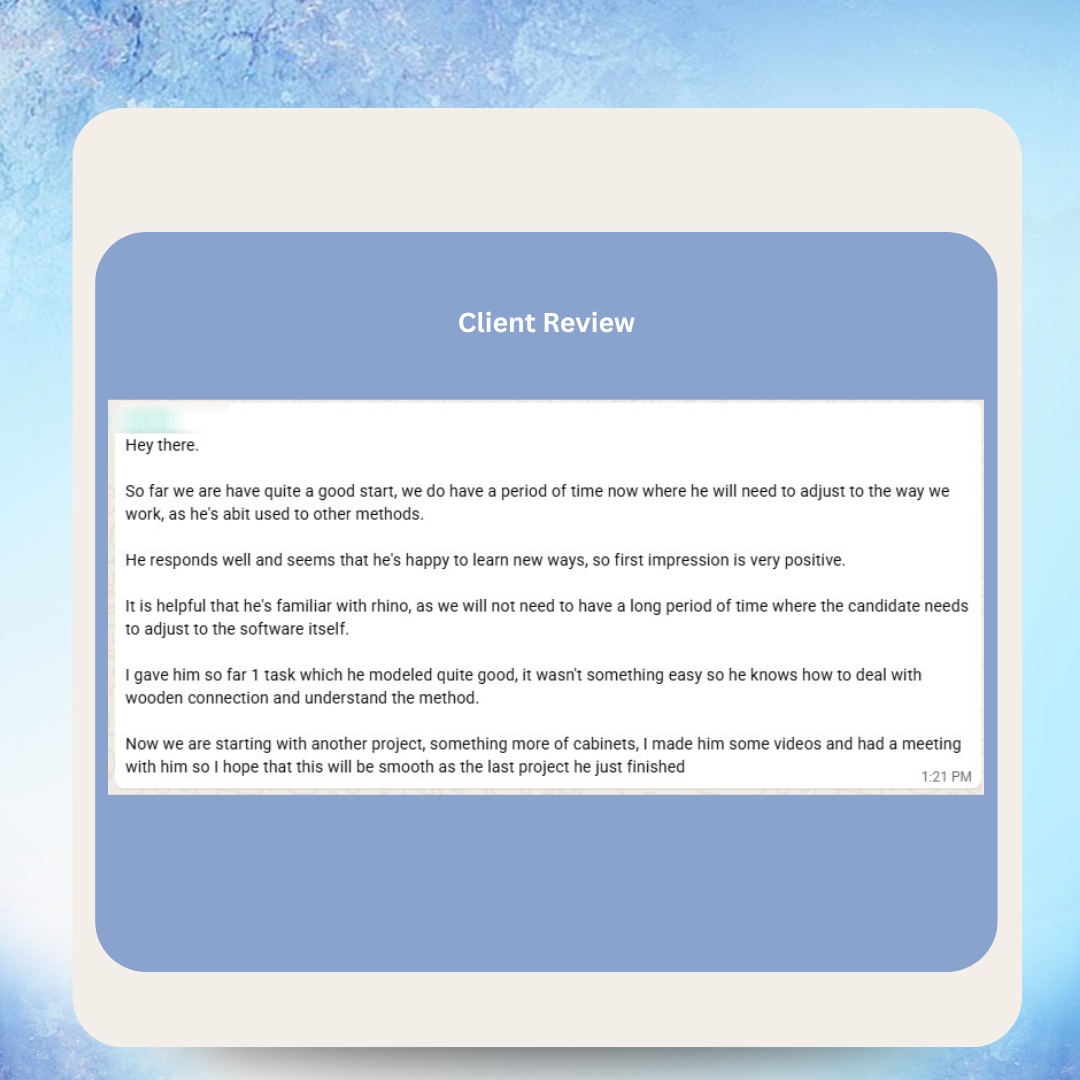
We've seen this firsthand. One of our clients in the furniture industry brought on a VA who was already familiar with Rhino and understood woodworking connections. Within the first project, the quality of 3D models impressed the team — and by the second project, the VA was producing cabinet designs independently with minimal supervision.
Mechanical and Industrial Engineering
HVAC design, piping layouts, mechanical systems, and industrial equipment all require extensive CAD documentation. Our VAs produce MEP drawings, P&IDs, equipment layouts, and as-built documentation that keeps engineering projects on schedule.
Aerospace and Automotive
Complex surface modeling, GD&T-heavy drawings, and strict documentation requirements define these industries. Our CAD VAs with CATIA, Creo, or NX experience handle component design, assembly modeling, and technical documentation within the stringent quality frameworks these sectors demand.
3D Printing and Rapid Prototyping
Designing for additive manufacturing requires understanding support structures, layer orientation, material properties, and build volume constraints. Our 3D CAD designers optimize models for FDM, SLA, SLS, and metal printing processes — creating files that print successfully without costly trial and error.
Why Filipino CAD Designers Excel at Technical Drafting
The Philippines produces over 200,000 engineering graduates annually, many from universities with strong CAD curriculum and practical design training. This creates a deep talent pool of technically skilled professionals who combine engineering education with exceptional English communication — a rare combination in offshore technical staffing.
Strong Engineering Education Foundation
Filipino CAD professionals typically hold degrees in mechanical engineering, industrial engineering, architecture, or industrial design. They understand the technical principles behind designs — stress analysis, material properties, manufacturing processes, thermodynamics — not just software operation. This engineering thinking translates directly to better CAD work.
Precision and Attention to Detail
CAD work demands precision. Every dimension matters for manufacturing. Every tolerance affects function. Filipino VAs are meticulous about measurements, fits, and documentation completeness. They double-check assemblies, verify interference, and catch errors before drawings reach production — preventing costly rework downstream.
Design for Manufacturing Mindset
Understanding how parts are actually made — machining, injection molding, sheet metal bending, casting, welding — prevents designs that look great on screen but fail in production. Our VAs design with manufacturing in mind from the start, avoiding undercuts in molds, maintaining minimum bend radii for sheet metal, and specifying realistic tolerances for the intended process.
Continuous Professional Development
Filipino technical professionals invest heavily in certification and skill development. Many hold Autodesk Certified Professional credentials, CSWA (Certified SolidWorks Associate) certification, or equivalent qualifications. They stay current with software updates, learn new tools proactively, and continuously improve their capabilities — benefiting your team without additional training investment.
Communication That Works Across Time Zones
English proficiency is a given — the Philippines has the third-largest English-speaking population globally. But communication in CAD goes beyond language. Our VAs understand technical vocabulary, can discuss design decisions clearly, document their work thoroughly, and present options when they encounter ambiguous specifications. You get a collaborative team member, not a disconnected contractor.
How Much Does a CAD Virtual Assistant Cost?
Cost is the elephant in the room — and the numbers speak for themselves. Here's a transparent comparison of what 3D CAD design support actually costs across different hiring models in 2026.
| Hiring Model | Hourly Cost | Annual Cost (Full-Time) | Additional Costs |
|---|---|---|---|
| US In-House CAD Designer | $28–$38/hr | $58,000–$79,000 | Benefits, office space, software licenses, training |
| UK/AU In-House Drafter | $25–$35/hr | $52,000–$73,000 | Same overhead as US plus employer taxes |
| Freelance CAD Services | $40–$100/hr | Varies by project | No consistency, availability risk, management overhead |
| Engineering Outsourcing Firm | $50–$150/hr | $100,000+ | Project markups, minimum commitments |
| VA MASTERS CAD VA | $8–$14/hr | $16,640–$29,120 | No benefits, no office, no recruitment fees |
That's up to 80% savings compared to hiring locally — without sacrificing quality. Your CAD VA is a dedicated team member who learns your standards, understands your projects, and delivers consistent work. Not a freelancer who disappears between projects or an outsourcing firm that cycles through anonymous drafters.
Without a Dedicated CAD VA
- Engineers waste 30-40% of their time on routine drafting
- Design revisions bottleneck product launches
- Freelancer rates spike during busy periods
- No consistency in drawing standards or file organization
- CAD backlog grows while talent is unavailable
With VA MASTERS CAD Designer
- Engineers focus exclusively on design innovation
- Overnight turnaround on revision requests
- Consistent monthly cost regardless of workload
- Standardized drawings, organized file libraries
- Scalable — add more CAD VAs as project pipeline grows
Real Numbers
A mid-size engineering firm with 3 full-time local drafters at $65,000/year each spends $195,000 annually on CAD labor alone. Replace those roles with VA MASTERS CAD VAs at an average of $11/hr, and the annual cost drops to approximately $68,640 — saving over $126,000 per year while maintaining the same output capacity. That's budget freed for R&D, prototyping, or hiring senior engineers who drive innovation.

Since working with VA Masters, my design workflow has become much more efficient. Hiring Jade as a virtual graphic designer has been a game-changer. He handles everything from creating custom plaque layouts to quickly implementing client revisions, which used to take me hours. The impact on my business has been huge — I can now take on more orders without worrying about design bottlenecks. I've also saved around 75% on design costs compared to hiring locally.
Our 6-Stage Process for Hiring CAD Virtual Assistants
Finding a CAD professional who can model in SolidWorks is easy. Finding one who understands your industry, follows your standards, and integrates seamlessly into your engineering workflow — that requires a recruitment process built specifically for technical roles.
VA MASTERS uses a 6-stage vetting process that starts with 1,000+ applicants and delivers 2-3 candidates who are genuinely qualified for your specific CAD requirements.
Detailed Requirements Analysis
We start by understanding exactly what your CAD role requires. Which software platforms? What industries? What types of deliverables — mechanical parts, architectural drawings, product renderings? What standards must they follow — ASME, ISO, company-specific? This precision ensures we search for the right profile from day one.
Targeted Candidate Collection
From our pool of 1,000+ applicants, we identify candidates with verified CAD experience in your specific software and industry. We look for engineering degrees, professional certifications, and portfolios demonstrating real-world project experience — not just tutorial completions or classroom exercises.
Technical Screening
Candidates pass an initial screening covering internet reliability, English communication, work history verification, and basic technical knowledge. We verify software proficiency claims against portfolio evidence and check references from previous CAD roles. Roughly half of candidates are eliminated at this stage.
Custom CAD Skills Test
This is where our process differs fundamentally from other 3D CAD drafter recruitment agencies. We build a custom skills test tailored to your exact requirements. If you need SolidWorks sheet metal design, the test involves sheet metal features. If you need Revit MEP coordination, the test involves MEP modeling. Candidates receive a real-world design task and must deliver production-quality output within a deadline. Only the top 5-10% pass.
In-Depth Interview
Surviving candidates undergo detailed interviews assessing communication skills, problem-solving approach, design methodology, and cultural fit. We evaluate how they handle ambiguous specifications, their approach to design reviews, and their ability to explain technical decisions clearly. 15-20 candidates reach this stage; 2-3 advance.
Client Interview and Selection
You meet the final 2-3 candidates, review their portfolios and skills test results, and choose the CAD designer who best fits your team. We present everything transparently — strengths, areas for growth, and our honest assessment of each candidate's fit for your specific requirements.
Need a CAD Professional Who Actually Understands Your Industry?
Tell us about your design requirements and we'll show you how our 6-stage recruitment process finds the exact CAD expertise you need — in days, not months.
Get in Touch →How to Evaluate CAD Skills Before Hiring
Whether you're hiring through VA MASTERS or evaluating candidates independently, knowing how to assess CAD skills separates hiring decisions you'll regret from ones that transform your engineering output.
Portfolio Review — What to Look For
A strong portfolio shows range and depth. Look for models with complex features — fillets, chamfers, lofts, sweeps, shell features — not just extruded rectangles. Check whether assembly models show proper mating and realistic motion. Review drawings for complete dimensioning, proper GD&T application, and professional presentation.
Red flags include portfolios filled exclusively with tutorial exercises, missing dimension callouts on drawings, or models that look impressive but ignore manufacturing reality (impossibly thin walls, zero draft angles on molded parts, sharp internal corners in machined features).
Technical Knowledge Assessment
Ask candidates to explain their design decisions. Why did they choose that material? How would they tolerance this feature for injection molding versus CNC machining? What happens if you change this dimension — does the model update cleanly or break? Understanding design intent separates operators from professionals.
Practical Skills Test
Nothing reveals capability like a real task. At VA MASTERS, our custom skills tests simulate actual work your CAD VA will perform. A candidate for a furniture design role might receive a set of sketches and dimensions for a cabinet system and be asked to model it in Rhino with proper woodworking connections. A candidate for mechanical design might receive a 2D drawing and create a fully parametric SolidWorks model with a complete drawing package.
Common Hiring Mistake
Don't evaluate CAD professionals on software knowledge alone. A candidate who knows every SolidWorks feature but doesn't understand manufacturing constraints will produce models that look great on screen and fail in production. Always test for industry knowledge alongside software proficiency.
CAD File Management and Design Standards
Organized CAD data is the foundation of efficient engineering operations. A dedicated CAD VA doesn't just create models — they establish and maintain the systems that keep your design data clean, accessible, and version-controlled.
File Organization Best Practices
Your VA implements folder structures that scale with your project load. Standard naming conventions ensure any team member can find any file instantly. Part numbering systems connect CAD files to your ERP, PLM, or project management tools. Drawing templates enforce consistent title blocks, revision tracking, and approval workflows.
Format Conversion and Compatibility
Engineering teams rarely work in a single CAD platform. Your VA handles conversions between formats — STEP and IGES for universal exchange, DWG for legacy compatibility, 3D PDF for stakeholder review, STL and 3MF for additive manufacturing. They verify geometry integrity after conversion and resolve import/export issues that waste engineering time.
Drawing Standards Compliance
Whether you follow ASME Y14.5, ISO 8015, or company-specific standards, your CAD VA ensures every drawing meets requirements. They apply proper dimensioning schemes, use correct GD&T symbology, include all necessary views and sections, and maintain documentation that prevents manufacturing ambiguity.
Version Control and Revision Management
Engineering changes create revision history that must be tracked accurately. Your VA manages revision blocks, maintains change logs, updates affected drawings when designs evolve, and ensures obsolete files are archived — not accidentally used for production. Whether you use a formal PLM system like Windchill or TeamCenter, or a structured folder-based approach, they adapt to your workflow.
AI Tools Transforming Modern CAD Workflows
Artificial intelligence is reshaping how CAD work gets done in 2026. Your CAD VA should understand these tools and integrate them into daily workflows for maximum productivity.
Generative design in Fusion 360 and SolidWorks creates optimized geometries based on load conditions and manufacturing constraints. Your VA defines parameters and evaluates AI-generated options, selecting designs that balance performance, cost, and manufacturability.
Automated markup processing tools like Autodesk's Markup Assist import redline annotations directly into editable CAD elements, reducing manual transcription by 25-40%. Your VA uses these tools to accelerate revision cycles without sacrificing accuracy.
AI-powered clash detection in Navisworks and BIM coordination tools identifies conflicts between disciplines automatically. Your VA reviews flagged issues, proposes resolutions, and coordinates changes across the design team — catching problems in the model rather than on the construction site.
The key insight: AI amplifies a skilled CAD professional, it doesn't replace one. Your VA leverages these tools to deliver more work at higher quality — combining technical judgment with automation for results neither could achieve alone.
VA MASTERS vs Other CAD Staffing Options
| Feature | VA MASTERS | Freelance Platforms | Engineering Outsourcing Firms |
|---|---|---|---|
| Custom CAD skills test per role | ✓ | ✗ | ✗ |
| Dedicated team member (not rotated) | ✓ | ✗ | ✗ |
| Ongoing HR management included | ✓ | ✗ | Varies |
| Transparent hourly pricing | ✓ | ✓ | ✗ |
| No upfront fees or recruitment charges | ✓ | ✓ | ✗ |
| Replacement guarantee | ✓ | ✗ | Varies |
| 6-stage vetting process (1,000+ applicants) | ✓ | ✗ | ✗ |
| Candidates delivered within 2 business days | ✓ | ✗ | ✗ |
| Performance reviews and ongoing support | ✓ | ✗ | Varies |
| Industry-matched portfolio review | ✓ | ✗ | ✓ |
What Our Clients Say




Real Messages from Real Clients


Hear From Our VAs — Happy VAs Deliver Better Results for Your Business



As Featured In






Frequently Asked Questions About CAD Virtual Assistants
Which CAD software can your virtual assistants use?
Our CAD VAs are proficient across all major platforms including AutoCAD, SolidWorks, Fusion 360, Inventor, Creo, CATIA, Revit, Rhino, SketchUp, ArchiCAD, and specialized tools like Mastercam, Civil 3D, and Plant 3D. We match candidates specifically to your software requirements during recruitment — every candidate is tested on the exact tools you use before they reach your interview.
Do your CAD VAs understand manufacturing processes?
Yes. Our CAD designers understand CNC machining, injection molding, sheet metal fabrication, casting, welding, and additive manufacturing processes. They design with manufacturing constraints in mind from the start — specifying realistic tolerances, avoiding impossible geometries, and considering material properties. This prevents costly redesigns discovered during production.
Can they work with GD&T and drawing standards?
Absolutely. Our VAs apply geometric dimensioning and tolerancing following ASME Y14.5 and ISO standards. They understand datum reference frames, position tolerances, profile tolerances, and how to specify fits that ensure proper assembly. They produce drawings with complete callouts that machine shops can work from without requesting clarification.
How do you test CAD skills during recruitment?
Every CAD candidate completes a custom skills test built specifically for your role requirements. If you need SolidWorks assemblies, the test involves assembly modeling. If you need architectural drawings in Revit, the test involves BIM modeling. Candidates receive a real-world design task matching your industry and must deliver production-quality output. Only the top 5-10% of candidates pass our skills assessment.
What about intellectual property and design confidentiality?
All VAs sign NDAs before accessing any client design data. We recommend secure file transfer protocols, VPN access to your systems, and clear IP ownership clauses in your service agreement. Our VAs understand that design confidentiality is non-negotiable and maintain strict security practices to protect your proprietary information.
How quickly can a CAD VA start contributing?
Most CAD designers are productive within the first week once they understand your standards, templates, and project context. Full productivity — working independently on complex models with minimal supervision — typically comes within 2-3 weeks. The onboarding period depends on your design complexity and how well-documented your standards are.
Can they handle both 2D drafting and 3D modeling?
Yes. Our AutoCAD virtual assistants handle complete 2D drafting — floor plans, section details, electrical layouts, mechanical drawings. They also create parametric 3D models, assemblies, and renderings. Most projects require both capabilities, and our VAs move fluidly between 2D documentation and 3D design work.
What if the CAD VA doesn't meet our quality expectations?
VA MASTERS provides a replacement guarantee. If your CAD designer doesn't meet your standards despite proper onboarding and training, we recruit a replacement at no additional cost. Our goal is long-term success, not just placement — which is why our custom skills testing catches most quality issues before hiring.
Can they create photorealistic renderings?
Yes. Our VAs use KeyShot, V-Ray, Blender Cycles, or built-in rendering engines in SolidWorks and Fusion 360 to create marketing-quality product visualizations. They understand lighting, material properties, scene composition, and post-processing techniques that produce renderings suitable for catalogs, websites, and investor presentations.
How does time zone difference work for CAD projects?
The Philippines operates in GMT+8, which creates a significant time zone overlap with Australia and partial overlap with European and US business hours. Many clients use this strategically — assigning design tasks at end of day and receiving completed models by morning. For real-time collaboration needs, Filipino VAs regularly adjust their schedules to overlap with client hours.
Do you provide CAD VAs for construction and AEC projects?
Yes. We recruit virtual construction drafting assistants skilled in Revit, AutoCAD Architecture, Civil 3D, and Navisworks. They produce construction documents, coordinate BIM models, generate clash detection reports, and maintain drawing sets through design development and construction administration phases. AEC firms are one of our strongest verticals for technical VA placement.
What does the hiring process look like from start to finish?
Step 1: You share your requirements — software, industry, deliverable types, and design standards. Step 2: We search our pool of 1,000+ applicants for matching profiles. Step 3: Candidates are screened and tested with a custom skills assessment. Step 4: You interview 2-3 top candidates and review their portfolios. Step 5: Your chosen VA is onboarded with access to your tools and standards. Candidates are typically delivered within 2 business days of finalizing requirements.
Can I hire multiple CAD VAs for larger teams?
Absolutely. Several of our clients have built remote CAD teams of 2-5 designers through VA MASTERS. We handle all recruitment, HR management, performance reviews, and ongoing support for each team member. Scaling your CAD capacity is as simple as telling us your next role requirements.
What industries have you placed CAD VAs in?
Manufacturing, architecture, construction, furniture design, automotive, aerospace, consumer products, industrial equipment, MEP engineering, interior design, jewelry, medical devices, and 3D printing companies. Our recruitment process adapts to any industry where CAD work is required — the skills test is always customized to your specific sector and design requirements.
Ready to Add Expert CAD Talent to Your Team — at Up to 80% Less?
Stop paying premium rates for routine drafting work. Our Filipino 3D CAD designers handle modeling, drawing, rendering, and documentation so your engineers focus on innovation.
- No upfront payment required
- No recruitment fees
- Custom CAD skills test for every candidate
- Candidates delivered within 2 business days
- Only pay when you're 100% satisfied